Here’s the real problem
Every sales org wants the same thing: clean, complete data as a deal moves forward.
Managers want forecasting accuracy. Ops wants reporting consistency. Leadership wants confidence in the pipeline. That means certain fields have to be filled out at specific stages—non-negotiable.
The problem? Making that happen in Salesforce is kind of a pain in the ass—for everyone involved.
For admins, it usually means piling on validation rules, bloated page layouts, or overly complex logic that’s hard to maintain.
For reps, it means clicking “Next Stage” and getting smacked with a wall of error messages:
- “Close Date is required.”
- “Next Steps cannot be blank.”
- “Success Criteria missing.”
Nothing kills momentum like being told something is wrong… without being shown what needs to be done.
So while everyone agrees on what data is required, the experience of collecting it is where things fall apart.
Common ways teams try to solve this (and why they’re frustrating)
Most teams start with good intentions and end up choosing between bad options.
- Validation rules: They technically work, but they’re reactive. Reps only find out what’s missing after they try to move the deal—and usually through multiple, annoying error messages.
- “Just put all the fields on the page” layouts: This makes admins happy and reps miserable. Everything is visible all the time, whether it’s relevant or not. The result? Field fatigue and sloppy data entry.
- Static Opportunity Path guidance: Salesforce Path looks nice, but it can’t adapt to deal type, direction, or context. You get limited fields, limited instructions, and zero flexibility.
All of these approaches enforce data integrity—but at the cost of user experience. And when UX is painful, reps either rush through it or work around it.
>>Related: How to Dynamically Require Fields Using Salesforce Dynamic Forms<<
What we built (and why it actually works)
We built a Stage Picker Screen Flow to solve the real problem: how to require the right data at the right time—without making Salesforce miserable to use.
Instead of punishing reps with validation errors, we guide them before anything breaks.
How it works
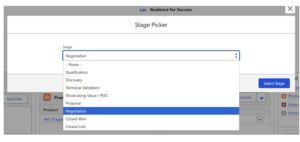
Rather than clicking a chevron in the standard Opportunity Path, reps click a dedicated “Stage Picker” button at the top of the opportunity.

From there, the experience is clear and intentional.
1. Pick the next stage
The rep chooses the stage they want to move the opportunity to. This single action tells Salesforce exactly what information is required next.
2. Show only what’s required—nothing more
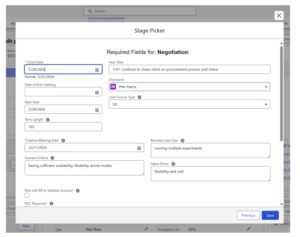
This is where the admin and rep both win. Based on the selected stage (and the opportunity type), the flow dynamically displays only the fields that must be completed to move forward.
Behind the scenes, this is powered by:
- Visibility filters on screen flow sections and fields
- Conditional logic tied to stage-specific and deal-type requirements
For example, moving a deal into Negotiation might prompt for:
- Close Date
- Next Steps
- Success Criteria
Reps know exactly what’s required, without digging around or getting hit with surprise error messages.
3. Save clean data, seamlessly
Once the required fields are completed, the opportunity updates automatically.
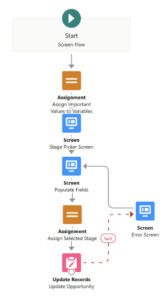
And if something goes wrong? Users are routed to a clear, intentional error screen—rather than a generic Salesforce failure that leaves them confused and annoyed.
The result: data integrity without UX punishment
This approach gives managers and admins exactly what they want:
- Required data at each stage
- Consistent reporting
- Better forecasting confidence
But it does it without overwhelming reps or slowing deals down.
Instead of validation errors out the wazoo, reps get a guided experience that tells them exactly what’s needed—right when it’s needed.
Clean data, happier users, and a Salesforce process people don’t actively resent.
FAQs
Why not just use Salesforce validation rules to require fields by stage?
Validation rules technically work, but they’re reactive. Reps only find out what’s missing after they try to move a deal, usually through multiple error messages. That creates frustration, slows deals down, and encourages workarounds. A guided flow surfaces required fields before the stage change, which improves both data quality and user experience.
Can this replace Salesforce Opportunity Path entirely?
It can complement or replace parts of it. Many teams keep Opportunity Path for high-level visibility but rely on the Stage Picker Flow to handle stage transitions and required data. This gives you the visual progress reps like, with the flexibility and logic that Path alone can’t provide.
Does this work for different opportunity types or sales motions?
Yes. The flow logic can change required fields based on opportunity type, segment, region, or any other criteria. That means enterprise, mid-market, and transactional deals can all follow the same process—without forcing the same fields on every rep.
What happens if a rep tries to skip required information?
They can’t. The flow won’t allow the stage change until all required fields for that stage are completed. But instead of blocking them with cryptic errors, it clearly shows exactly what needs to be filled out in one place.
Is this hard to maintain for admins over time?
Not at all. Because the logic lives in a Screen Flow (instead of dozens of validation rules), it’s easier to update, test, and evolve as your sales process changes. Adding or removing required fields is far simpler than untangling layered validation logic later.