
If you built your HubSpot lead scoring a while ago and haven’t touched it since, this post is for you.
HubSpot has significantly rebuilt its lead scoring tool. The old scoring property had real limitations that made it hard to build a model that reflected actual buying behavior. You couldn’t filter for frequency AND recency at the same time. Points stuck around forever. You hit the 100 filter cap faster than you’d expect.
The new tool fixes most of that. But it introduces enough new concepts that it’s worth getting familiar with how it works before you start rebuilding.
What’s New in HubSpot’s Lead Scoring Tool
The updated tool now supports scoring across multiple object types (contacts, companies, and deals) depending on your subscription. You can also create multiple scores per object, which is handy if you sell to different segments or want separate scores for different teams.
There are three score types to choose from:
- Engagement scores qualify records based on actions and interactions like visiting your website, subscribing to your newsletter, clicking a CTA, or opening a marketing email.
- Fit scores qualify records based on demographic information and property values like job title, company size, or annual revenue.
- Combined scores bring both together, giving you an engagement score, a fit score, and a combined total all in one.
For most B2B teams, a combined score is the right call.
How Scoring Works Under the Hood
Scores are built using score groups, each with their own point limit, which roll up into an overall score ceiling. You set a score limit (the max for the total score) and a group limit (the max any single group can contribute).
Here’s a simple example: if your overall score limit is 100 and you have an “Engagement with sales” group capped at 60 points and an “Engagement with marketing” group capped at 40, no single group can push someone over your MQL threshold on its own. A completed meeting might be worth 20 points. A marketing email link click might be worth 5. The group structure keeps any one signal from doing all the heavy lifting.
One thing that trips people up: when you assign multiple values to a rule, you have to choose between score together and score individually.
- Score together awards one set number of points when any of the values are met, regardless of how many are met.
- Score individually awards points for each value met, so events accumulate over time.
For fit criteria, score together usually makes sense. For engagement events where repeat actions signal stronger intent, score individually is the right call.
Score Decay: The Feature Most Teams Are Skipping
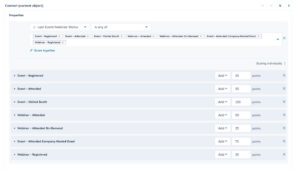
Score decay automatically reduces the point value of engagement events based on how long ago they occurred. Intervals can be set to every 1, 3, 6, or 12 months, with each month equal to 30 days. It only applies to engagement and combined score event groups, not fit criteria.
Without decay, a contact who attended a webinar two years ago and went completely dark still carries those points. That inflates your scores and surfaces leads with no real current intent. With decay, stale engagement stops counting and your scores reflect what’s actually happening right now.
Pro tip: Turn decay on for your engagement event groups. Match your decay window to your average sales cycle. If deals typically take 6 months to close, a 1-month decay window will tank scores too fast. Start at 3 months and adjust from there.

Score Thresholds Are More Useful Than They Look
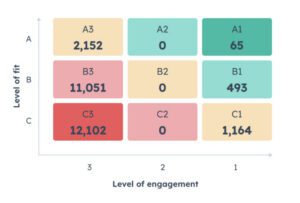
Once your score is live, you can set thresholds to categorize records by score range. For engagement and fit scores, the labels are High, Medium, and Low. For combined scores, you get an alphanumeric system: A1, A2, A3, B1, B2, B3, C1, C2, C3.
The letter reflects fit (A = high fit, C = low fit). The number reflects engagement (1 = high engagement, 3 = low engagement). An A1 is your best lead. A C3 is probably not worth your sales team’s time.
Each threshold creates a corresponding property you can plug directly into workflows, segments, and reports. It makes routing a lot cleaner than stacking score-based filters from scratch.
Gotchas to Watch Out For
Turning on a score triggers a retroactive evaluation. When you first activate a score, HubSpot evaluates all existing records based on their current and historical data. That sounds helpful, and it is, but it can produce a wave of unexpected workflow triggers if your thresholds aren’t set up carefully yet. Use the “preview score distribution” feature before you go live.
Updating a live score affects downstream tools. Workflows, segments, and reports that reference your score property will be impacted when you make changes. Before publishing any updates, check the “Used In” tab on the score property and audit everything referencing it.
Filter criteria behavior isn’t always what you’d expect. Separate property or event rules in the same group update the score independently. A contact doesn’t need to meet both rules to get points from the group. But if you use the “Add criteria” option to add multiple criteria to a single rule, AND logic kicks in and all criteria must be met. The difference matters a lot when you’re building more complex scoring logic.
Pro Tips Before You Build
Model first, build second. Before you touch a single rule, define what your MQL actually looks like. What behaviors and traits did your best-converted customers share? Align on the criteria before you start assigning point values, not the other way around.
Get sales involved early. Your scoring model is only as useful as the leads it surfaces. Ask your reps what traits and behaviors actually predict a good conversation. If they’re ignoring MQLs because the quality is off, the problem is almost always in the criteria, not the threshold.
Start simple. Launch with five to ten criteria. Get some deals through the pipeline, see how the scores tracked, and iterate. You can always add complexity later. Untangling a bloated model that sales has lost confidence in is a much harder problem to fix.
Revisit quarterly. Audience behavior changes. What predicted conversion six months ago may not hold today. Pull your most recently closed deals, check what their scores looked like at handoff, and adjust if the model is drifting.
FAQs
What is HubSpot lead scoring?
It’s a tool for assigning point values to contacts, companies, or deals based on their actions and attributes. The goal is to help marketing and sales figure out which records are most likely to convert so you can prioritize accordingly.
What’s the difference between engagement scores, fit scores, and combined scores?
Engagement scores track behaviors like website visits, email clicks, and form submissions. Fit scores track demographic or firmographic data like job title, company size, or industry. Combined scores pull both together and give you a fuller picture of lead quality, including separate engagement and fit values alongside the overall total.
What HubSpot subscription do I need for lead scoring?
Lead scoring is available on Marketing Hub Professional and Enterprise, and Sales Hub Professional and Enterprise. AI-powered contact scoring requires Marketing Hub Enterprise.
What is score decay and should I use it?
Score decay reduces the point value of engagement events over time so stale activity doesn’t keep inflating your scores. For most B2B teams, yes, you should turn it on. It keeps your scores tied to current intent rather than historical behavior that may no longer mean anything.
What happens when I update a live score?
HubSpot re-evaluates all records retroactively based on the updated criteria. Any workflows, segments, or reports referencing that score property may be affected. Audit your dependent tools before making changes to a score that’s actively being used.