
Every martech stack starts with good intentions. Someone sees a problem, finds a tool that solves it, plugs it in — and for a while, it works. Then another tool gets added. And another. Integrations multiply, budgets blur, and somewhere along the way the tools stop being solutions and start being the problem.
The result? Disparate data. Disjointed reporting. Sync errors. Missed leads. Angry customers. And a MOPS team firefighting 24/7 instead of building something sustainable.
There’s a better way. Here’s the framework for building martech that actually scales.
- 80% of employees lose productivity time monthly due to digital friction
- 1.3 days lost per employee per month on average
- 42% of organizations suffer revenue losses from tech inefficiencies
- 69% of employees say dysfunctional technology drives staff turnover
Think of MOPS as a Highway Department
Here’s the mental model that changes everything: treat Marketing Operations as The Department of Digital Data Transportation. Once you see it this way, every decision gets clearer.
- Process is your traffic flow — highways, on-ramps, exits, detours, and final destinations.
- Your CDP or CRM is the home garage: the system of truth where core data lives, and access is tightly controlled.
- Data is traffic itself — it needs to move smoothly or everything backs up.
- SLAs are traffic laws. They define how the road is used and who enforces it.
- MOPS is traffic enforcement — keeping the digital highway safe and functional for everyone.
Just as you wouldn’t build a new highway without civil engineers, blueprints, and a feasibility study, you shouldn’t add new tools to your stack without a proper planning process.
>>Related: 7 Ways to Break into Marketing Operations: Your Step-by-Step Guide<<
Phase 1: Plan and Design
Before evaluating a single vendor, gather requirements from every level of the organization — top to bottom.
Start at the executive layer What metrics does the board care about? What KPIs matter to each director — CS, Marketing, Sales? How frequently do they need that data? Document all of it.
Drill down by role A CMO’s metrics are fundamentally different from a CRO’s, which are different again from a Director of Marketing. Each matters. Each must be captured. Skipping this step is how you end up building for one team while inadvertently breaking another.
Define what’s actually being solved Before assuming a new tool is the answer, challenge the request rigorously:
- Who is requesting this tool, and why?
- What specific functionality are they asking for?
- Who else will benefit?
- Is this truly a missing feature — or a training gap?
You may not need to build a new road to get home faster. Sometimes you just need a more efficient route on the one you already have.
Phase 2: Confirm the Budget
Skipping the budget conversation early is one of the most common ways martech projects derail. Before research begins, get clear answers to these questions:
- What’s the upfront budget — including integration support?
- What’s the annual run cost for the platform itself?
- Which department(s) will carry the cost?
- How will executives measure and report ROI for this tool?
Phase 3: Draw Your Tech Stack Diagram
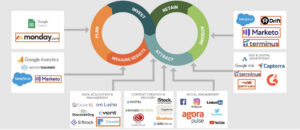
Great MOPS leaders love a good flowchart — and for good reason. A living, documented tech stack diagram is one of the most valuable artifacts a MOPS team can maintain.
- Use AI to generate a diagram that maps all your existing systems and their relationships.
- Keep the current-state diagram as a source of truth, version-controlled and accessible to the team.
- When new requests come in, copy the diagram and update it to show where the new tool would connect — before any decisions are made.
Phase 4: Audit Before You Add
Using your requirements and your tech stack diagram, conduct a feasibility study of what you already have. Document each existing tool’s features and map them against the new requirements. This does two things: it builds the MOPS case for or against the new tool, and it ensures you’re not duplicating capability you’re already paying for.
The goal isn’t to say no all the time. The goal is cost, efficiency, and data integrity. When those are your north stars, executives trust you — and so do adjacent teams. When requesters feel heard, they’re far more likely to accept your recommendation either way.
Phase 5: Build the Case
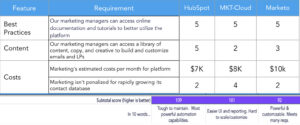
If the audit shows a new tool is genuinely needed, it’s time to evaluate your options systematically. Create a Vendor Comparison Rating Card and use it to score every candidate.
- Add your requirements and feature categories to the card.
- Research at least 3 tools, no more than 5 — enough to compare meaningfully, not so many you drown in demos.
- Schedule recorded demos with each vendor. Ask questions tied directly to your documented requirements and features.
- Score each tool (1–5 per feature) and summarize each in 10 words to keep it honest.
- Present findings with scores and a recommendation to executive leadership for sign-off.
The MOPS Checklist: A Scalable Process
Once you’ve approved a new tool, integration is where things most often break down. Here’s the full process, in order:
- Plan and Design: Gather and confirm requirements from all stakeholders.
- Budget: Confirm tool budget and which departments will fund it.
- Pre-Audit Sign-off: Get sign-off from Executives and Leads across Sales, Marketing, BDR, CS, and RevOps before proceeding.
- Audit: Run a feasibility study of your existing stack, SLAs, and processes.
- Build Case: Research new tools, compare against the audit, and score via the Vendor Rating Card.
- Sign-off: Present findings to leadership for final approval.
- Integration: Assemble a proper integration team — API developer, Project Manager, OPs managers, and executive sign-off.
- Data Flow Plan: Update your tech stack diagram to show how data enters, moves, and exits the new system.
- Testing: Build a test plan with acceptance criteria covering QA, UAT, and end-to-end scenarios.
- SLAs: Document users, permissions, and rules — who imports data, who builds campaigns, who has admin access.
- Training: Train Admins, Standard Users, and Reporting Users separately. One size doesn’t fit all.
Where Things Break Down
Most martech failures trace back to the same root causes. If your stack is a mess right now, you’ll probably recognize one or more of these:
- Insufficient requirements gathered upfront
- Misalignment between management layers
- Siloed teams making independent tool decisions
- Unclear or undisclosed budgets
- Undefined processes before launch
- No planning — just a “we need this by Friday” culture
The fix isn’t always a new tool. Often it’s a cleaner process applied to the tools you already have.
The Bottom Line
Building martech that scales isn’t about having the most tools or the newest integrations. It’s about building a system where every tool earns its place, every data flow is documented, and every team knows their role in keeping the digital highway moving.
Templatize the process. Enforce the SLAs. Draw the diagram. And the next time someone walks in with a shiny new software request, you’ll have a framework to evaluate it — rather than a gut feeling and a prayer.
FAQ
At minimum, MOPS should review the tech stack diagram and data flow quarterly with team leaders. This keeps the team ahead of new requests, surfaces redundancies before they become costly, and ensures your stack continues to serve the business as goals and team structures evolve.