Everyone knows the goal: call the leads, call them fast, and convert them into pipeline. Simple in theory. Brutal in practice.
Sales managers are heads-down on pipe management. SLA reports only surface problems after the damage is done. And somewhere in the middle, qualified leads go cold while your team is busy doing everything else.
Here’s how to fix it — for real, with a framework that sticks and help you win on speed to lead.
- 78% of B2B customers buy from the vendor who responds first
- 80% drop in lead qualification odds after the first 5 minutes
- 21x more likely to qualify a lead when contacted within 5 minutes vs. 30 minutes
- 42 hours — the average B2B response time to a new lead. 74% of companies miss the 5-minute window entirely.
Lead Management Is the Most Critical Component of Your Marketing Operations
You can have a beautiful martech stack, a perfectly tuned demand gen engine, and a content machine firing on all cylinders — and still lose deals because nobody called the lead in time. Lead management is where revenue is made or lost. Everything else is setup.
The core problem isn’t motivation — it’s process. Without defined stages, clear SLAs, and visibility into what’s happening in real time, even the best sales teams operate in the dark.
Start With the Handoff Points
Before touching your CRM or MAP, align on the answers to these five questions:
- Who is responsible for the contact at each lifecycle stage?
- What information do we need before a contact gets qualified?
- How long does a BDR/AE have to call or email someone at each stage?
- If the BDR/AE doesn’t meet the SLA, does the lead get reassigned?
- When do BDRs, AEs, and their managers get alerted?
These aren’t technical questions — they’re alignment questions. Get Sales, Marketing, BDR, and RevOps in a room and write down the answers before anyone touches a workflow.
>>Related: Glossary: The Demand Gen Funnel<<
Define Your Lifecycle Stages and SLAs
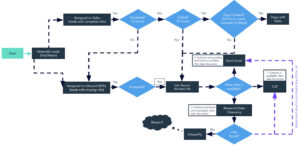
Here’s a sample lifecycle model with SLAs attached to each stage:
- Known — Prospect in the database, no engagement yet. No SLA.
- Engaged — Has responded to a campaign, lead score under 100 points. No SLA.
- Marketing Qualified Lead (MQL) — Lead score of 100+ points, ready to pass to BDR/AE. SLA: Accept or reject within 4 hours.
- Sales Accepted Lead (SAL) — BDR/AE has accepted the MQL and is actively following up. SLA: First touch within 1 hour; 10 activities (calls + emails) within 30 days.
- Meeting Scheduled — BDR has qualified the prospect (2 of 4 BANT) and AE has accepted the meeting. SLA: Accept or reject within 24 hours.
- Sales Qualified Lead (SQL) — AE has qualified on all 4 BANT criteria; opportunity moves to Discovery+. SLA: If no progression to Discovery+ within 60 days, mark Closed Lost.
- Nurture — Right person, right company, not in an active buying cycle. Could re-qualify in the future. Nurture reason required.
- Disqualified — Wrong person, wrong company, will never buy. DQ reason required.
- Closed Lost — Closed Lost reason required.
Types of SLAs to Define
Three categories of SLAs every revenue team needs documented:
- MQL Handoff SLA — How long does a BDR/AE have to accept or reject an MQL? The maximum should be 24–48 hours, but faster is always better. This is the most critical window — the longer an MQL sits unworked, the colder it gets.
- Time to First Outreach — How quickly should the rep make first contact after accepting? Ideally this is automated or enforced via a task. A mix of phone and email is best, with a phone call within 24 hours.
- Minimum Expected Follow-Up — No “one and done” leads. Define a minimum number of calls and emails within a set number of days. If a rep makes one call and moves on, you’re leaving pipeline on the table.
Build Your Lead Scoring Model
Lead scoring is how marketing decides when to hand a lead to sales. Done right, it keeps the pipeline full without overwhelming the BDR team. Done wrong, it either floods sales with junk or holds back ready buyers.
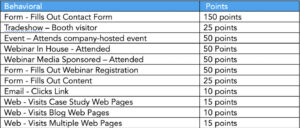
Here’s a sample behavioral scoring model:
- Fills out contact form: 150 points
- Attends company-hosted event: 50 points
- Attends webinar (in-house or sponsored): 50 points
- Fills out webinar registration: 50 points
- Fills out content form: 25 points
- Tradeshow booth visitor: 25 points
- Visits case study web pages: 15 points
- Visits multiple web pages: 15 points
- Clicks email link: 10 points
- Visits blog web pages: 10 points
Six scoring best practices:
- Involve Sales. Ask them what signals actually matter. Listen, incorporate their feedback, and keep them bought in.
- Keep it simple. Don’t build a complex model with dozens of behaviors, demographic attributes, and predictive scoring layers.
- Ignore email opens and clicks. They’re unreliable and increasingly inaccurate due to bot activity and privacy filters.
- Only use data you actually have. If “Industry” isn’t captured on most of your forms, don’t build a scoring rule around it.
- Hand-raisers go straight to sales. If someone fills out a demo or contact us form, they bypass scoring entirely and go directly to BDR/Sales — full stop.
- Use one model and refine it quarterly. A simple model you actually review beats a sophisticated one you set and forget.
POV: The MQL Threshold Isn’t a Magic Number
One of the most common mistakes in lead management is treating the MQL threshold as a fixed, sacred number. It’s not.
The MQL threshold should be driven by Sales’ capacity and their feedback. You want to qualify enough leads to keep reps busy — but not so many that they can’t prioritize what actually matters. And as capacity ebbs and flows throughout the year, the threshold should flex accordingly.
Remember: an MQL isn’t answering “is this person an opportunity?” It’s answering “should someone call them?” The MQL is marketing passing the baton to Sales or BDRs and saying: somebody needs to look at this.
Define Your Nurture and Disqualified Reasons
Every lead that doesn’t convert needs a reason — not just for data hygiene, but for closing the loop with marketing and improving lead quality over time.
- Nurture reasons (“not right now”) — No Budget, No Interest/Need, Timing Not Right, Product Roadmap Requirement, Under Contract with Competitor, Unresponsive.
- Disqualified reasons (“trash forever”) — Bad Data, Wrong Person (e.g., Student), Non-Sales Inquiry, Not an ICP Fit, Works for Competitor.
The distinction matters. Nurture leads can re-enter the funnel. Disqualified leads should not.
Where Things Break Down
If your lead management process isn’t working, it’s almost always one of these:
- BDRs/AEs can’t see the leads they’re supposed to work
- Lead volume is too high to follow up on everything
- SLAs are not defined or reported on
- Lead dispositions are not defined or required
- Different assignment logic for different objects creates confusion
- Assignment only fires once and never re-triggers
- Assignment happens at the form or campaign level instead of centrally
Any one of these will silently kill your conversion rates. Most teams are dealing with several at once.
Reporting Can Significantly Improve Speed to Lead
Here’s the uncomfortable truth: when most teams turn on SLA flags for the first time, 70% of the queue is red. It’s usually the first time the team realizes how bad the problem actually is.
The red flags reveal one of four root causes: the timelines are unrealistic, there aren’t enough people working leads, the team doesn’t know how to follow the process — or all three at once.
The goal is 90% SLA compliance. A realistic daily expectation is that every BDR/AE clears their SLA queue to green before signing off for the day. Visibility changes behavior. Once reps can see their own compliance rate, performance improves rapidly — often dramatically.
One Sponge client went from 30% MQL follow-up SLA compliance to 85% within two months of implementing this system.
Another reduced speed to lead from 48 hours to 32 minutes using a single BDR experiment. Conversion rate to meeting jumped from 4.5% to 9.7% in three months — enough to justify funding three additional BDR hires.
A third client saw a 50% lift in Demo to Opportunity conversion after activating automated SLA measurement and gaining real-time visibility into where follow-up was lagging.
The Lead Management Checklist
Get Sales, Marketing, BDR, and RevOps to define and sign off on every item below before touching your CRM or MAP:
- Define lifecycle stages and SLAs
- Build and document the lead scoring model (behavioral + demographic + decay)
- Map out Nurture/DQ and Closed Lost reasons
- Define assignment rules for both net new and nurture leads
- Agree on BDR/Sales “to do lists” and list views
- Reporting on SLA performance, conversion rates, and QA issues is in place
Do not start changing systems until everyone has signed off. Implementing changes before alignment is how you create a new set of problems on top of the ones you’re trying to fix.
How to Move Forward
The path forward is straightforward — the hard part is getting everyone in a room.
Start by scheduling a two-hour workshop with Marketing, Sales, BDR, and RevOps stakeholders. The agenda is simple: review what you have versus what you want across lifecycle stages, SLAs, scoring, assignment rules, nurture/DQ reasons, and rep workflows. Document everything in writing.
Lock and sign off on requirements before implementing any changes to your CRM and MAP. Build out reporting to track SLA compliance, conversion rates, and any QA issues surfaced along the way. Then review that reporting as a group — regularly — and use what you find to refine the process over time.
Lead management isn’t a one-time project. It’s an ongoing system. Build it right, instrument it well, and it becomes one of the most reliable levers for revenue growth you have.
FAQ
What is speed to lead and why does it matter?
Speed to lead is how quickly a sales rep follows up after a new lead comes in. Companies that respond within five minutes are 21x more likely to qualify that lead — yet the average B2B company takes 42 hours to respond. Being first is often the difference between winning and losing the deal.
What’s the difference between a Nurture lead and a Disqualified lead? A Nurture lead is the right person at the right company, just not ready to buy yet — they may come back. A Disqualified lead will never be a fit — permanently remove them from active outreach. Mixing the two wastes both marketing spend and sales time.
How do you set the right MQL threshold?
The MQL threshold should be driven by Sales’ capacity, not a fixed number. Pass enough leads to keep reps productive, but not so many they can’t prioritize. Think of an MQL as marketing saying “somebody should look at this” — not “this person is ready to buy.” Adjust the threshold as capacity changes throughout the year.
Why do lead management processes fail even when SLAs exist?
Usually because no one can see whether SLAs are being met in real time. Most reporting looks backward, surfacing problems after leads have already gone cold. Other culprits include assignment logic that only fires once, undefined lead dispositions, and reps who lack a clear daily workflow for managing their queue.
How quickly can SLA compliance improve?
Faster than most teams expect. One Sponge client went from 30% to 85% MQL follow-up compliance within two months. Another cut response time from 48 hours to 32 minutes and more than doubled their meeting conversion rate in three months. Visibility is the accelerant — once reps can see their own compliance, behavior changes quickly.